
Different Mobile Screen Sizes
Mobile devices dominate digital interactions. From browsing websites and shopping online to consuming media and managing work, smartphones are the primary gateway to the internet for billions of users worldwide. Yet one of the most complex challenges in mobile development and design is accommodating the wide variety of mobile screen sizes.
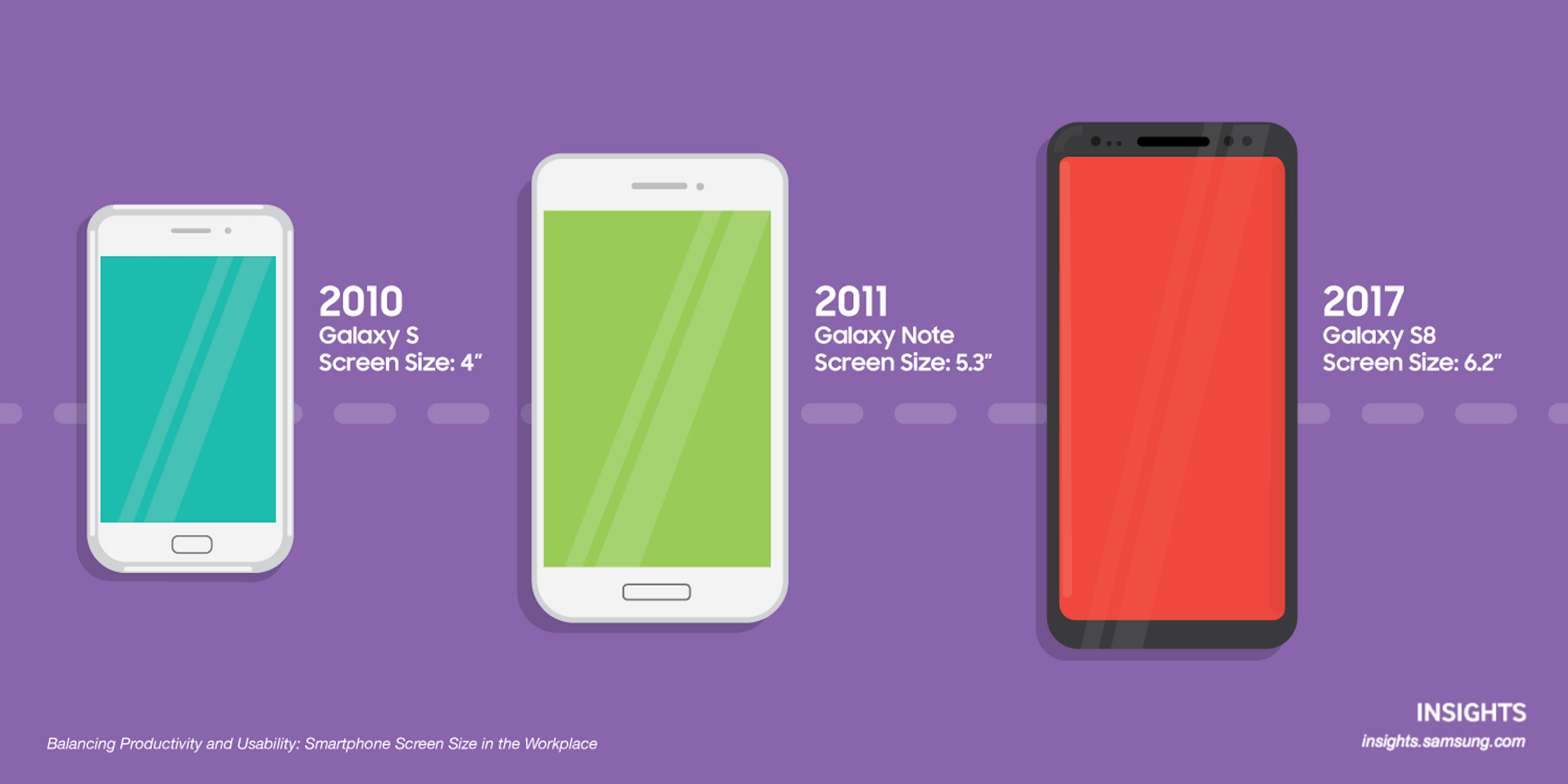
Unlike the early days of smartphones—when screen sizes were relatively uniform—today’s market includes compact devices, large-screen “Plus” models, foldables, and everything in between. Screen size affects layout decisions, typography, navigation, media display, performance, and overall user experience.
This article explores different mobile screen sizes, common resolutions, pixel density considerations, aspect ratios, foldable devices, responsive design strategies, and best practices for building adaptable mobile experiences.
Why Mobile Screen Size Matters
Screen size influences how users interact with content. A layout that works perfectly on a 6.7-inch display may feel cramped on a 5.4-inch device. Text that is readable on one screen may appear too small or too large on another.
Mobile screen size affects:
-
Readability
-
Touch target accuracy
-
Visual hierarchy
-
Content prioritization
-
Navigation structure
-
Media presentation
Designing for mobile requires understanding both physical screen dimensions and logical resolution differences.
Understanding Screen Size vs. Resolution
Many people confuse screen size with screen resolution. These are related but distinct concepts.
Screen Size
Screen size is measured diagonally in inches. For example, a device might have a 6.1-inch display. This measurement reflects physical dimensions, not pixel count.
Screen Resolution
Resolution refers to the number of pixels displayed horizontally and vertically (e.g., 1170 × 2532 pixels). Higher resolutions allow for sharper images and clearer text.
Pixel Density (PPI)
Pixels per inch (PPI) measures pixel density. Higher PPI results in crisper visuals. Modern smartphones typically range from 300 PPI to over 500 PPI.
Understanding all three metrics helps designers create layouts that scale effectively.
Common Smartphone Screen Size Categories
While there are countless models on the market, most smartphones fall into general size categories.
1. Small Smartphones (Under 5.8 Inches)
These devices prioritize portability and one-handed use.
Example:
-
iPhone SE – 4.7-inch display
Characteristics:
-
Compact physical dimensions
-
Reduced screen real estate
-
Ideal for minimalistic layouts
Design Considerations:
-
Prioritize essential content
-
Avoid dense multi-column layouts
-
Use scalable typography
Though less common today, small-screen devices remain important in certain markets.
2. Standard Smartphones (5.8–6.2 Inches)
This is one of the most common size ranges.
Examples:
-
iPhone 13 – 6.1 inches
-
Samsung Galaxy S23 – 6.1 inches
Characteristics:
-
Balanced portability and viewing space
-
Comfortable for most users
-
Suitable for media consumption
Design Considerations:
-
Maintain readable font sizes
-
Ensure tap targets are thumb-friendly
-
Optimize above-the-fold content
This category often serves as the baseline for responsive design.
3. Large Smartphones (6.3–6.7 Inches)
Large-screen phones dominate premium markets.
Examples:
-
iPhone 15 Pro Max – 6.7 inches
-
Samsung Galaxy S24 Ultra – 6.8 inches
Characteristics:
-
More immersive media experience
-
Increased multitasking potential
-
Slightly reduced one-handed usability
Design Considerations:
-
Utilize additional vertical space
-
Enhance media-rich layouts
-
Avoid stretching content too widely
Larger screens allow more flexibility but require thoughtful layout management.
Aspect Ratios and Their Impact
Modern smartphones often use tall aspect ratios such as 19.5:9 or 20:9.
Taller aspect ratios allow:
-
More vertical content
-
Enhanced scrolling experiences
-
Better multitasking in split-screen modes
Designers must consider safe areas around notches, punch-hole cameras, and system gestures.
Foldable Devices
Foldable smartphones introduce entirely new screen considerations.
Examples:
-
Samsung Galaxy Z Fold 5
-
Google Pixel Fold
Foldables function as both phone-sized screens and tablet-sized displays when unfolded.
Design Challenges:
-
Supporting multiple layout states
-
Handling screen transitions
-
Maintaining consistent navigation
Foldables blur the line between mobile and tablet design.
Logical Pixels vs. Physical Pixels
Modern mobile operating systems use logical pixels (density-independent pixels) to ensure consistency across devices.
For example:
-
iOS uses points
-
Android uses dp (density-independent pixels)
This abstraction allows designers to maintain consistent sizing regardless of hardware differences.
Safe Areas and Interface Constraints
Modern devices include:
-
Notches
-
Camera cutouts
-
Rounded corners
-
Gesture navigation bars
Designers must account for safe areas to prevent content from being obscured.
Operating systems provide layout guides to ensure compatibility.
Responsive vs. Adaptive Design
Responsive Design
Responsive design uses flexible layouts that adjust fluidly based on screen size.
Techniques include:
-
Media queries
-
Relative units (%, em, rem)
-
Flexible grids
Responsive design is widely used in mobile web development.
Adaptive Design
Adaptive design creates fixed layouts for specific breakpoints.
For example:
-
Layout A for small screens
-
Layout B for medium screens
-
Layout C for large screens
Adaptive design offers greater control but requires more maintenance.
Designing for Thumb Reach
Screen size affects ergonomics.
On large phones, users struggle to reach the top corners with one hand.
Design strategies:
-
Place primary actions within thumb reach
-
Use bottom navigation bars
-
Avoid critical actions in extreme top corners
User comfort directly impacts usability.
Typography and Mobile Screen Sizes
Typography must scale appropriately.
Recommendations:
-
Minimum body text size: 16px
-
Line height: 1.4–1.6
-
Avoid excessive line length
On smaller screens, reduce content density.
On larger screens, avoid oversized text that appears disproportionate.
Media and Image Scaling
Images must adapt to various resolutions and aspect ratios.
Best practices:
-
Use responsive image techniques
-
Serve appropriately sized images
-
Maintain consistent aspect ratios
-
Avoid distortion
High-resolution screens require optimized images to maintain clarity without slowing performance.
Touch Target Guidelines
Screen size influences touch accuracy.
Recommended minimum touch target size:
-
44 × 44 points (iOS guideline)
-
48 × 48 dp (Android guideline)
Smaller screens require careful spacing to prevent accidental taps.
Performance Considerations
Larger screens often mean higher resolutions, which require:
-
More GPU power
-
Larger image assets
-
Greater memory usage
Optimization techniques include:
-
Image compression
-
Lazy loading
-
Efficient animations
Performance should not suffer due to visual enhancements.
Breakpoints in Mobile Web Design
Common mobile breakpoints include:
-
320px width (small phones)
-
375px width (standard phones)
-
414px width (larger phones)
Designers often test layouts at these widths to ensure compatibility.
Testing Across Devices
Testing on real devices is crucial.
Simulators help, but physical testing reveals:
-
Color accuracy
-
Touch responsiveness
-
Performance differences
-
Gesture interactions
Cross-device testing ensures consistency.
Mobile Operating System Differences
iOS and Android devices may share similar screen sizes but differ in:
-
Navigation patterns
-
System fonts
-
UI conventions
-
Gesture systems
Understanding platform guidelines improves user familiarity and comfort.
Accessibility Across Screen Sizes
Accessibility considerations include:
-
Scalable text
-
High contrast
-
Screen reader compatibility
-
Orientation flexibility
Smaller screens can pose additional challenges for users with visual impairments.
Inclusive design ensures usability across diverse user needs.
Tablet Overlap
Some large smartphones approach tablet dimensions.
For example:
-
iPad mini
Designers may need to account for layouts that transition smoothly between mobile and tablet views.
Global Market Variations
In some markets, smaller and budget devices remain prevalent.
Designers should not assume users have the latest flagship devices.
Optimizing for mid-range and entry-level smartphones ensures broader accessibility.
Future Trends in Mobile Screen Sizes
Mobile hardware continues to evolve.
Emerging trends include:
-
Rollable screens
-
Under-display cameras
-
Thinner bezels
-
Higher refresh rates
As screens become more immersive, designers must rethink content boundaries.
Best Practices for Handling Multiple Mobile Screen Sizes
-
Design mobile-first.
-
Use flexible grids.
-
Prioritize essential content.
-
Maintain consistent spacing.
-
Test across breakpoints.
-
Consider ergonomics.
-
Optimize performance.
-
Ensure accessibility compliance.
Strategic planning reduces fragmentation challenges.
The Business Impact of Screen Size Adaptability
Poor adaptation to screen size can result in:
-
High bounce rates
-
Low engagement
-
Reduced conversions
-
Negative brand perception
Conversely, optimized layouts improve:
-
Usability
-
Customer satisfaction
-
Conversion rates
-
Brand trust
Mobile experience often defines first impressions.
An Opportunity
The diversity of mobile screen sizes presents both a challenge and an opportunity. From compact devices like the iPhone SE to expansive foldables like the Samsung Galaxy Z Fold 5, today’s mobile ecosystem demands flexible, thoughtful design.
Understanding screen dimensions, resolution, aspect ratios, and ergonomics enables designers and developers to create adaptable experiences. Responsive techniques, accessible typography, optimized media, and performance-conscious development ensure content remains usable across devices.
As technology continues to evolve, mobile screen sizes will likely diversify even further. Success in this landscape requires continuous testing, user-centered thinking, and a commitment to adaptability.
Ultimately, designing for multiple mobile screen sizes is not just about fitting content onto different displays. It is about delivering seamless, intuitive, and engaging experiences—no matter the device in a user’s hand.
