
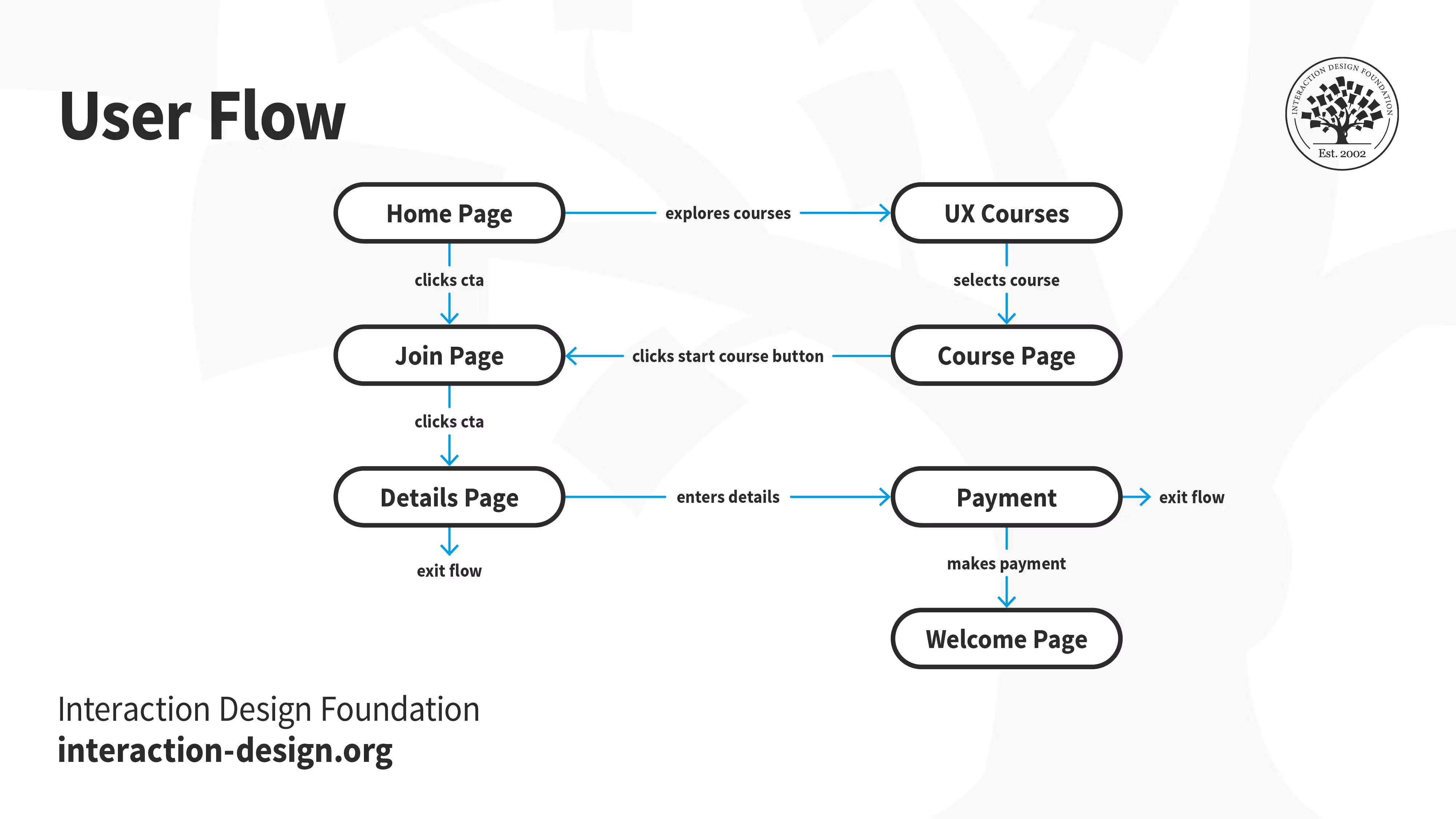
Maximizing User Actions on Your Website
In the competitive digital landscape, attracting visitors to a website is only half the battle. The true challenge lies in encouraging users to take meaningful actions—whether that’s subscribing to a newsletter, completing a purchase, downloading resources, or engaging with interactive content. Maximizing user actions is central to improving conversion rates, driving business growth, and building long-term customer relationships.
User actions are influenced by a combination of factors, including user experience (UX) design, persuasive content, interactivity, personalization, and trust. Websites that understand and leverage these factors can guide visitors along carefully crafted journeys, turning casual visitors into loyal users. This article provides a comprehensive guide to maximizing user actions on websites, covering strategy, design, psychology, and technology.
Understanding User Actions
User actions are any measurable behaviors that visitors perform on your website. Common examples include:
-
Clicking on call-to-action (CTA) buttons.
-
Submitting contact or signup forms.
-
Making purchases or completing transactions.
-
Downloading resources like eBooks, reports, or software.
-
Sharing content on social media.
-
Commenting, rating, or reviewing products and services.
Maximizing these actions requires understanding user intent, designing intuitive pathways, and reducing friction throughout the user journey.
User behavior can be categorized as:
-
Micro-conversions: Small actions that indicate engagement, such as clicking links, viewing products, or signing up for a newsletter.
-
Macro-conversions: Primary goals that contribute directly to business objectives, such as purchases, subscriptions, or lead generation.
Focusing on both types of conversions ensures a holistic approach to engagement and success metrics.
Step 1: Define Goals and Key Metrics
Before optimizing your website, define clear objectives and metrics. Without measurable goals, it’s difficult to determine whether your strategies are effective.
Identifying Goals:
-
Business Objectives: Determine what user actions matter most for your company’s growth.
-
Audience Objectives: Understand what users seek on your website, such as solutions, information, or entertainment.
-
Conversion Metrics: Identify specific metrics to track, including CTA clicks, form submissions, sales, downloads, or video views.
Examples of KPIs:
-
Click-through rate (CTR) on CTAs.
-
Conversion rate for product purchases.
-
Number of newsletter signups.
-
Time on page and pages per session.
-
Bounce rate for key landing pages.
Setting measurable goals provides a benchmark for testing and optimizing strategies.
Step 2: Understand Your Audience
To maximize user actions, you must understand the motivations, preferences, and behaviors of your audience.
Techniques for Audience Research:
-
User Personas: Create detailed profiles representing your typical users, including demographics, goals, pain points, and preferred interactions.
-
Behavioral Analytics: Use tools like Google Analytics or Hotjar to track user behavior, such as click paths, session duration, and navigation patterns.
-
Surveys and Feedback: Collect qualitative insights from users about their needs, preferences, and frustrations.
-
User Interviews: Conduct direct conversations with customers to uncover deeper motivations and barriers.
Understanding your audience allows you to design experiences that resonate with their needs and guide them toward desired actions.
Step 3: Optimize Website Navigation
Intuitive navigation is critical for maximizing user actions. Users should be able to find information or features quickly and effortlessly.
Navigation Best Practices:
-
Simplify Menus: Limit top-level navigation items to avoid overwhelming users.
-
Logical Hierarchy: Group related content and features under clear categories.
-
Sticky Navigation: Keep menus visible as users scroll to facilitate exploration.
-
Breadcrumbs: Help users understand their location and return to previous sections.
-
Search Functionality: Include a search bar for quick access to content or products.
Streamlined navigation reduces friction, allowing users to complete desired actions without frustration.
Step 4: Create Persuasive Call-to-Actions (CTAs)
CTAs are essential for guiding users toward meaningful actions. A well-crafted CTA increases engagement, conversions, and overall user satisfaction.
CTA Best Practices:
-
Clear and Action-Oriented Text: Use verbs that indicate the desired action, such as “Download Now,” “Sign Up,” or “Get Started.”
-
Visual Contrast: Make CTAs stand out with color, size, and placement.
-
Placement and Context: Position CTAs where users naturally engage with content, such as at the end of an article or within product descriptions.
-
Urgency and Incentives: Incorporate scarcity or benefits to encourage immediate action, e.g., “Limited Offer” or “Free Trial.”
-
Consistency: Maintain consistent design and language to reinforce familiarity and trust.
Effective CTAs provide clarity, motivate action, and reduce hesitation.
Step 5: Improve Website Performance
Performance issues, such as slow load times or unresponsive features, discourage users from completing actions.
Performance Optimization Techniques:
-
Optimize Images and Videos: Compress files without sacrificing quality to reduce load times.
-
Minify CSS and JavaScript: Remove unnecessary code to improve performance.
-
Use Caching and CDNs: Speed up content delivery by serving files from servers close to users.
-
Mobile Optimization: Ensure your site is responsive and functions seamlessly across devices.
-
Monitor Performance Metrics: Track page load times, server response, and Core Web Vitals.
Fast, responsive websites provide a smooth user experience, reducing abandonment and increasing conversions.
Step 6: Leverage Interactive and Dynamic Elements
Interactive websites encourage users to engage actively rather than passively. Interactivity enhances attention, comprehension, and retention.
Interactive Features to Maximize Actions:
-
Forms with Inline Validation: Guide users through submission processes, reducing errors.
-
Quizzes and Surveys: Capture attention while gathering valuable user insights.
-
Interactive Product Configurators: Allow users to customize products, increasing engagement and purchase likelihood.
-
Sliders, Accordions, and Tabs: Organize content dynamically, making it easier to explore.
-
Gamification: Reward users with points, badges, or progress tracking to encourage exploration.
Dynamic content creates a sense of involvement, increasing the likelihood of completing key actions.
Step 7: Personalize User Experiences
Personalization makes users feel understood and increases the probability of action.
Personalization Strategies:
-
Behavior-Based Recommendations: Suggest products, articles, or resources based on previous interactions.
-
Geolocation Features: Tailor content, offers, or messaging based on user location.
-
User Accounts and Dashboards: Save preferences, purchase history, or progress for a customized experience.
-
Email and Retargeting: Send personalized follow-ups or offers based on user behavior.
Tailored experiences increase relevance, engagement, and conversion potential.
Step 8: Apply Principles of Persuasive Design
Persuasive design leverages psychological principles to motivate user action.
Key Principles:
-
Reciprocity: Offer value first, such as free resources or helpful content, to encourage reciprocal actions.
-
Social Proof: Highlight reviews, testimonials, or user-generated content to build trust.
-
Scarcity and Urgency: Promote limited-time offers or low-stock items to prompt immediate action.
-
Commitment and Consistency: Encourage small initial actions, which often lead to larger commitments over time.
-
Authority: Showcase expertise, certifications, or endorsements to reinforce credibility.
Persuasive design aligns user motivation with business objectives, increasing action likelihood.
Step 9: Optimize Content for Engagement
Content is a critical driver of user actions. Engaging content encourages users to interact, explore, and convert.
Content Optimization Strategies:
-
Clarity and Relevance: Ensure content addresses user needs and questions directly.
-
Scannable Layout: Use headings, bullet points, and visuals for easy reading.
-
Multimedia Integration: Include videos, images, and infographics to increase engagement.
-
Storytelling: Use narratives to connect emotionally and motivate action.
-
Content Upgrades: Offer downloadable resources or bonus content to incentivize engagement.
Well-crafted content motivates action by providing value, clarity, and context.
Step 10: Reduce Friction in User Flows
Friction occurs when users encounter obstacles or confusion while navigating your site or completing actions. Reducing friction increases completion rates.
Techniques to Reduce Friction:
-
Simplify Forms: Minimize required fields and provide auto-fill or validation features.
-
Streamline Checkout: Reduce steps, offer guest checkout, and provide multiple payment options.
-
Clear Instructions: Use concise, action-oriented language to guide users.
-
Visual Cues: Use buttons, arrows, and progress indicators to communicate next steps.
Reducing friction makes it easier for users to take action, increasing engagement and conversion rates.
Step 11: Build Trust and Credibility
Users are more likely to take action on websites they trust. Building credibility encourages interaction and reduces hesitation.
Strategies for Building Trust:
-
Professional Design: Ensure a polished, cohesive design with consistent branding.
-
Security Features: Display SSL certificates, secure payment options, and privacy policies.
-
Testimonials and Reviews: Highlight positive experiences from real users.
-
Transparency: Provide clear pricing, policies, and terms.
-
Reliable Customer Support: Offer chat, email, or phone assistance to address concerns.
Trust reduces anxiety, encouraging users to engage fully with your website.
Step 12: Implement A/B Testing and Conversion Optimization
A/B testing allows you to experiment with design, content, or functionality to determine what drives the most user actions.
Steps for Conversion Optimization:
-
Identify elements to test, such as headlines, CTAs, or page layouts.
-
Create alternative versions for comparison.
-
Split traffic between versions evenly.
-
Measure engagement, conversion, and retention metrics.
-
Implement winning changes and iterate continuously.
Continuous optimization ensures that your website evolves to maximize user actions and business outcomes.
Step 13: Use Behavioral Triggers and Automation
Behavioral triggers prompt users to take action based on their interactions with your site.
Examples of Behavioral Triggers:
-
Exit-Intent Popups: Offer discounts or resources when users attempt to leave.
-
Scroll-Triggered Messages: Display prompts after users reach specific page sections.
-
Time-Based Offers: Introduce limited-time deals to encourage immediate action.
-
Retargeting Campaigns: Follow up with users who interacted but did not complete an action.
Behavioral triggers increase conversions by engaging users at the optimal moment.
Step 14: Leverage Analytics to Inform Decisions
Analytics provides the data needed to identify opportunities for maximizing user actions.
Key Analytics Practices:
-
Track User Journeys: Understand paths to conversion and drop-off points.
-
Segment Users: Analyze behavior across demographics, traffic sources, and devices.
-
Monitor Key Metrics: CTR, conversion rates, bounce rates, and engagement metrics indicate success.
-
Identify Patterns: Use data to refine CTAs, content, and navigation for better outcomes.
Data-driven decisions ensure that optimization strategies are based on evidence, not assumptions.
Step 15: Foster Community and Social Engagement
Community engagement encourages users to interact with content and take meaningful actions.
Community Strategies:
-
User-Generated Content: Encourage reviews, comments, and shared experiences.
-
Social Sharing Options: Make it easy for users to share content or products.
-
Discussion Forums: Create spaces for users to connect and exchange ideas.
-
Membership or Loyalty Programs: Reward engagement and encourage repeat actions.
Building community strengthens emotional connection and increases the likelihood of user engagement.
Step 16: Optimize for Mobile Users
Mobile devices account for a significant portion of web traffic. Optimizing for mobile ensures users can take actions easily on smaller screens.
Mobile Optimization Techniques:
-
Responsive Design: Adjust layouts, images, and interactions for all screen sizes.
-
Touch-Friendly Elements: Use appropriately sized buttons, forms, and navigation elements.
-
Speed Optimization: Minimize page load times on mobile networks.
-
Simplified Flows: Reduce steps for actions such as checkout or form submissions.
Mobile optimization ensures that user actions are accessible and convenient, maximizing engagement across devices.
Step 17: Maintain Continuous Improvement
Maximizing user actions is an ongoing process. Continuous improvement ensures your website adapts to changing user behavior, preferences, and technology.
Continuous Improvement Practices:
-
Conduct regular audits of analytics and engagement metrics.
-
Update content, CTAs, and interactive elements to maintain relevance.
-
Test new designs, layouts, or features regularly.
-
Gather ongoing user feedback for insights into evolving needs.
Iterative optimization keeps your website effective in driving user actions over time.
A Comprehensive Strategy
Maximizing user actions on your website requires a comprehensive strategy that combines design, content, psychology, personalization, and continuous optimization. By understanding user behavior, reducing friction, and guiding visitors through intuitive, persuasive, and interactive experiences, businesses can significantly increase engagement, conversions, and loyalty.
Key strategies include:
-
Defining clear goals and KPIs to measure success.
-
Understanding audience motivations, preferences, and pain points.
-
Optimizing navigation, user flow, and usability.
-
Crafting persuasive, visually distinct CTAs.
-
Improving website performance and mobile accessibility.
-
Leveraging interactive and dynamic content.
-
Personalizing experiences based on behavior and preferences.
-
Applying persuasive design principles to motivate action.
-
Creating engaging, value-driven content.
-
Reducing friction throughout user flows.
-
Building trust and credibility through transparency and professionalism.
-
Implementing A/B testing and conversion optimization.
-
Using behavioral triggers and automation for timely engagement.
-
Analyzing analytics to inform iterative improvements.
-
Fostering community and social engagement.
-
Continuously monitoring and refining website strategies.
Websites that maximize user actions are not just functional—they are dynamic, user-centered platforms that guide visitors through meaningful journeys. Businesses that invest in understanding and optimizing user behavior create websites that inspire engagement, foster loyalty, and drive measurable results.
In the modern digital environment, maximizing user actions is not optional; it is essential for achieving business growth and establishing a strong online presence. By combining strategy, design, technology, and psychology, you can transform your website into a powerful tool that encourages meaningful interactions and delivers lasting value.
